Instruments Commands and Queries
Identification of an instrument
There are several ways to identify an Oxygen instrument, since instruments are part of screens, reports or groups.
Identify per instrument identification: Each instrument gets a unique identification string. With this string, you can refer to a specific instrument, regardless of whether it is on a screen, a report, or within a group.
Examples:
-> INSTRuments:...? "instrument_identification"[,...]
Identify per index number: Each instrument has a specfic index number when it is created on a screen. A specific instrument can also be referred to via the screen and instrument index number.
Examples:
-> :SCReen:ITEM1:INSTRuments:ITEM1:...? //obtaining instrument 1 on screen 1

-> :SCR1:INSTR1:...?   //short form
Common Instrument Commands and Queries
:INSTRuments:IDEntifier <old_identifier>,<literal>,<new_identifier>
Syntax |
:INSTRuments:IDEntifier <old_identifier>,<literal>,<new_identifier> |
||||||||||||||||
|---|---|---|---|---|---|---|---|---|---|---|---|---|---|---|---|---|---|
Description |
Sets a new identifier for an instrument. |
||||||||||||||||
Parameter |
|
||||||||||||||||
Explanation |
Sets a new identifier of a given instrument. Note: In the instrument subsystem it makes no sense to query the identification of an instrument. A query for instrument identification can be found in the screen subsystem (see example below). |
||||||||||||||||
Example |
-> :SCR1:INSTR1:IDE? <- (STRING,"rec01") -> :INSTR:IDE "rec01",STRING,"rec02" -> :SCR1:INSTR1:IDE? <- STRING,"rec02" |
:INSTRuments:POSition? <instrument_identifier>
Syntax |
:INSTRuments:POSition? <instrument_identifier> |
||||||||
|---|---|---|---|---|---|---|---|---|---|
Description |
Get the position of an instrument. |
||||||||
Parameter |
|
||||||||
Explanation |
Queries the left (x) and top (y) edge of the instrument on the screen. |
||||||||
Return Format |
<Literal>,nrf1,nrf1 | NONE The first numeric value is the x positon, the second the y position of the instrument. The range of x and y is between 0.0 - 1.0. Note: the position is related to a virtual screen width and height of 1.0 (= 100%). |
||||||||
Example |
-> :INSTR:POS? "rec01" <- (POINT,2.083333333333334E-1,2.166666666666667E-1) ... -> :SCR1:INSTR1:POS? //equivalent query <- (POINT,2.083333333333334E-1,2.166666666666667E-1) |
:INSTRuments:POSition <instrument_identifier>,<literal>,<x_position>,<y_position>
Syntax |
:INSTRuments:POSition <instrument_identifier>,<literal>,<x_position>,<y_position> |
||||||||||||||||||||
|---|---|---|---|---|---|---|---|---|---|---|---|---|---|---|---|---|---|---|---|---|---|
Description |
Set the position of an instrument. |
||||||||||||||||||||
Parameter |
|
||||||||||||||||||||
Explanation |
Sets the left (x) top (y) edge of the instrument to position x and y on the screen. Note: the position is related to a virtual screen width and height of 1.0 (= 100%). |
||||||||||||||||||||
Example |
-> :INSTR:POS? "rec01" <- (POINT,0.0,0.0) -> :INSTR:POS "rec01",POINT,0.5,0.5 //moves left (x) and top (y) edges to the middle of the screen <- (POINT,2.083333333333334E-1,2.166666666666667E-1) -> :INSTR:POS? "rec01" <- (POINT,5.0E-1,5.0E-1) |
:INSTRuments:SIZe:WIDth? <instrument_identifier>
Syntax |
:INSTRuments:SIZe:WIDth? <instrument_identifier> |
||||||||
|---|---|---|---|---|---|---|---|---|---|
Description |
Get the width of an instrument. |
||||||||
Parameter |
|
||||||||
Explanation |
Queries the width of the instrument on the screen. |
||||||||
Return Format |
<Literal>,nrf1 | NONE Returns the width of an instrument calculated relative to a virtual screen with of 1.0 (= 100%). |
||||||||
Example |
-> :INSTR:SIZ:WID? "rec01" <- (FLOAT,7.5E-1) ... -> :SCR1:INSTR1:SIZ:WID? //equivalent query <- (FLOAT,7.5E-1) |
:INSTRuments:SIZe:WIDth <instrument_identifier>,<literal>,<width>
Syntax |
:INSTRuments:SIZe:WIDth <instrument_identifier>,<literal>,<width> |
||||||||||||||||
|---|---|---|---|---|---|---|---|---|---|---|---|---|---|---|---|---|---|
Description |
Set the width of an instrument. |
||||||||||||||||
Parameter |
|
||||||||||||||||
Explanation |
Sets the width of an instrument relative to the screen width. Note: the width is calculated related to a virtual screen width of 1.0 (= 100%). |
||||||||||||||||
Example |
-> :INSTR:SIZ:WID? "rec01" <- (FLOAT,7.5E-1) -> :INSTR:SIZ:WID "rec01",POINT,0.5,0.5 -> :INSTR:SIZ:WID? "rec01" <- (FLOAT,5.0E-1) |
:INSTRuments:SIZe:HEIght? <instrument_identifier>
Syntax |
:INSTRuments:SIZe:HEIght? <instrument_identifier> |
||||||||
|---|---|---|---|---|---|---|---|---|---|
Description |
Get the height of an instrument. |
||||||||
Parameter |
|
||||||||
Explanation |
Queries the height of the instrument on the screen. |
||||||||
Return Format |
<Literal>,nrf1 | NONE Returns the height of an instrument calculated relative to a virtual screen height of 1.0 (= 100%). |
||||||||
Example |
-> :INSTR:SIZ:HEI? "rec01" <- (FLOAT,5.0E-1) ... -> :SCR2:INSTR2:SIZ:HEI? //equivalent query if it is the 2nd instrument on screen 2 <- (FLOAT,5.0E-1) |
:INSTRuments:SIZe:HEIght <instrument_identifier>,<literal>,<height>
Syntax |
:INSTRuments:SIZe:HEIght <instrument_identifier>,<literal>,<height> |
||||||||||||||||
|---|---|---|---|---|---|---|---|---|---|---|---|---|---|---|---|---|---|
Description |
Set the height of an instrument. |
||||||||||||||||
Parameter |
|
||||||||||||||||
Explanation |
Sets the height of an instrument relative to the screen height. Note: the height is calculated related to a virtual screen height of 1.0 (= 100%). |
||||||||||||||||
Example |
-> :INSTR:SIZ:HEI? "rec01" <- (FLOAT,5.0E-1) -> :INSTR:SIZ:HEI "rec01",FLOAT,0.75 -> :INSTR:SIZ:HEI? "rec01" <- (FLOAT,7.5E-1) |
Subsystems of Oxygen instruments
An instrument can have additional sub components:
:CHANNels: Oxygen instruments generally allow data visualization from multiple channels. The subsystem offers tools to access and adjust instrument channels.
:AXIs: Some Oxygen instruments visualize data in diagram form. This subsystem enables querying and configuring the diagram axes.
:CURSors: For Oxygen instruments with diagrams, cursors allow users to query channel data at specific positions. This subsystem enables or disables cursors and provides access to channel data at those points.
:OUTputchannel: Formerly part of the :SCReen subsystem, this module now functions autonomously, providing improved flexibility for individual command handling.
Instrument Channels Subsystem
:INSTRuments:CHANnels:COUNt? <instrument_identifier>
Syntax |
:INSTRuments:CHANnels:COUNt? <instrument_identifier> |
||||||||
|---|---|---|---|---|---|---|---|---|---|
Description |
Queries the number of assigned channels. |
||||||||
Parameter |
|
||||||||
Explanation |
Returns the number of channels assigned to a specified Oxygen instrument. |
||||||||
Return Format |
(INT,nrf) | NONE |
||||||||
Example |
-> :INSTR:CHAN:COUN? "rec01" <- (INT,3) -> :INSTRuments:CHANnels:COUNt? "rec01" <- (INT,3) ... -> :SCR1:INSTR1:CHAN:COUN? //equivalent if first instrument on screen 1 <- (INT,3) |
:INSTRuments:CHANnels:IDs? <instrument_identifier>
Syntax |
:INSTRuments:CHANnels:IDs? <instrument_identifier> |
||||||||
|---|---|---|---|---|---|---|---|---|---|
Description |
Queries all assigned channel IDs of the referred specified instrument. |
||||||||
Parameter |
|
||||||||
Explanation |
Returns a list of channel-ids of all assigned channels. |
||||||||
Return Format |
(CHANNEL_ID_VECTOR,<String>[,<String >[, …]]) | NONE |
||||||||
Example |
-> :INSTR:CHAN:ID? "SAT1" <- (CHANNEL_ID_VECTOR,"7710725503421775896","7710725503421775898") ... -> SCR1:INSTR1:CHAN:ID? //equivalent if first instrument on screen 1 <- (CHANNEL_ID_VECTOR,"7710725503421775896","7710725503421775898") |
:INSTRuments:CHANnels:IDs <instrument_identifier>,[<literal>],<String>[,<String>[,…]]
Syntax |
:INSTRuments:CHANnels:IDs <instrument_identifier>,[<literal>],<String>[,<String>[,…]] |
||||||||||||||||
|---|---|---|---|---|---|---|---|---|---|---|---|---|---|---|---|---|---|
Description |
Assigns the specified channels to an instrument. |
||||||||||||||||
Parameter |
|
||||||||||||||||
Explanation |
Sets the specified channel(s) of an instrument. Note: The channels can be referred to by their channel name, too. |
||||||||||||||||
Example |
-> :INSTR:CHAN:ID? "SAT1"? <- NONE ... -> :INSTR:CHAN:ID "SAT1",CHANNEL_ID,"9622785020217262103" -> :INSTR:CHAN:ID? "SAT1" <- (CHANNEL_ID_VECTOR,"9622785020217262103") ... -> :INSTR:CHAN:ID "SAT1",CHANNEL_ID_VECTOR,"9622785020217262110","9622785020217262109" -> :INSTR:CHAN:ID? "SAT1" <- (CHANNEL_ID_VECTOR,"9622785020217262110","9622785020217262109") |
:INSTRuments:CHANnels:CLEar <instrument_identifier>
Syntax |
:INSTRuments:CHANnels:CLEar <instrument_identifier> |
||||||||
|---|---|---|---|---|---|---|---|---|---|
Description |
Clear instrument channels list. |
||||||||
Parameter |
|
||||||||
Explanation |
Remove all assigned channels from the specified instrument. |
||||||||
Example |
-> :INSTR:CHAN:ID? "SAT1" <- (CHANNEL_ID_VECTOR,"9622785020217262110","9622785020217262109") -> :INSTR:CHAN:CLEar "SAT1" -> :INSTR:CHAN:ID? "SAT1" <- NONE |
:INSTRuments:CHANnels:ADD <instrument_identifier>,[<literal>],<String>[,<String>[,…]]
Syntax |
:INSTRuments:CHANnels:ADD <instrument_identifier>,[<literal>],<String>[,<String>[,…]] |
||||||||||||||||
|---|---|---|---|---|---|---|---|---|---|---|---|---|---|---|---|---|---|
Description |
Add channels to instrument. |
||||||||||||||||
Parameter |
|
||||||||||||||||
Explanation |
Add the specified channel(s) to existing instrument channels. Note: The channels can be referred to by their channel name, too. |
||||||||||||||||
Example |
-> :INSTR:CHAN:ID? "SAT1"? <- (CHANNEL_ID_VECTOR,"9622785020217262106") ... -> :INSTR:CHAN:ADD "SAT1",CHANNEL_ID_VECTOR,"9622785020217262110","9622785020217262109" -> :INSTR:CHAN:ID? "SAT1" <- (CHANNEL_ID_VECTOR,"9622785020217262106","9622785020217262110","9622785020217262109") ... -> :INSTR:CHAN:ADD "SAT1","AI 1/1 Sim" |
:INSTRuments:CHANnels:REMove <instrument_identifier>,[<literal>],<String>[,<String>[,…]]
Syntax |
:INSTRuments:CHANnels:REMove <instrument_identifier>,[<literal>],<String>[,<String>[,…]] |
||||||||||||||||
|---|---|---|---|---|---|---|---|---|---|---|---|---|---|---|---|---|---|
Description |
Remove channels from instrument. |
||||||||||||||||
Parameter |
|
||||||||||||||||
Explanation |
Removes one or more channels from the instrument. Note: The channels can be referred to by their channel name, too. |
||||||||||||||||
Example |
-> :INSTR:CHAN:ID? "SAT1"? <- (CHANNEL_ID_VECTOR,"9622785020217262103") -> :INSTR:CHAN:ID? "SAT1" <- NONE ... -> :INSTR:CHAN:ID? "SAT1"? <- (CHANNEL_ID_VECTOR,"9622785020217262103","9622785020217262105","9622785020217262107") -> :INSTR:CHAN:REM "SAT1",CHANNEL_ID_VECTOR,"9622785020217262103","9622785020217262105" -> :INSTR:CHAN:ID? "SAT1"? <- (CHANNEL_ID_VECTOR,"9622785020217262107") ... -> :INSTR:CHAN:REM "SAT1","AI 1/1 Sim" |
:INSTRuments:CHANnels:SELect? <instrument_identifier>
Syntax |
:INSTRuments:CHANnels:SELect? <instrument_identifier> |
||||||||
|---|---|---|---|---|---|---|---|---|---|
Description |
Queries the selected channel of a saturation meter. |
||||||||
Parameter |
|
||||||||
Explanation |
Returns the channel-id of the selected channel in a saturation meter. |
||||||||
Return Format |
(CHANNEL_ID,<String>) | (CHANNEL_ID,NONE) | NONE |
||||||||
Example |
-> :INSTR:CHAN:SEL? "Sat1" <- (CHANNEL_ID,"8155737441601323031") -> :INSTR:CHAN:SEL? "SAT2" <- (CHANNEL_ID,NONE) ... -> SCR1:INSTR1:CHAN:SEL? //equivalent if first instrument on screen 1 <- (CHANNEL_ID,"8155737441601323031") |
:INSTRuments:CHANnels:SELect <instrument_identifier>,<literal>,<literal>|<String>
Syntax |
:INSTRuments:CHANnels:SELect <instrument_identifier>,<literal>,<literal>|<String> |
||||||||||||||||
|---|---|---|---|---|---|---|---|---|---|---|---|---|---|---|---|---|---|
Description |
Set the selected channel in a saturation meter. |
||||||||||||||||
Parameter |
|
||||||||||||||||
Explanation |
This command is used to set/reset the selected channel in a saturation meter to highlight the referred channel. Note: The channels can be referred to by their channel name, too. |
||||||||||||||||
Example |
-> :INSTR:CHAN:ID? "Sat" <- (CHANNEL_ID_VECTOR,"8155737441601323031","8155737441601323032","8155737441601323033") -> :INSTR:CHAN:SEL? "Sat" <- (CHANNEL_ID,NONE) -> :INSTR:CHAN:SEL "Sat",CHANNEL_ID,"8155737441601323031" -> :INSTR:CHAN:SEL? "Sat" <- (CHANNEL_ID,"8155737441601323031") -> :INSTR:CHAN:SEL "Sat",CHANNEL_ID,NONE -> :INSTR:CHAN:SEL? "Sat" <- (CHANNEL_ID,NONE) ... -> :INSTR:CHAN:SEL "Sat",CHANNEL_ID,"AI 1/1 Sim" |
:INSTRuments:CHANnels:RESet <instrument_identifier>
Syntax |
:INSTRuments:CHANnels:RESet <instrument_identifier> |
||||||||
|---|---|---|---|---|---|---|---|---|---|
Description |
Resets the saturation of all assigned instrument channels. |
||||||||
Parameter |
|
||||||||
Explanation |
Initialize the saturation calculation of all assigned instrument channels. If the instrument is a saturation meter and no channels are assigned, then all scalar channels will be initialized (see scpi command :CHANNELlist:SATuration:RESet). Note: The channels can be referred to by their channel name, too. |
||||||||
Example |
-> :INSTR:CHAN:RESET "Sat" ... -> SCR1:INSTR1:CHAN:RESET |
Instrument Axis Subsystem
If available, the Instrument Axis Subsystem is used to query and manipulate the attributes of individual axis components. The control of the instrument’s individual axes is handled by the following subsystems:
:X: Manages the attributes and handling of the instrument’s x-axis.
:Y: Manages the attributes and handling of the instrument’s y-axis.
:INSTRuments:X:DURation? <instrument_identifier>
Syntax |
INSTRuments:X:DURation? <instrument_identifier> |
||||||||
|---|---|---|---|---|---|---|---|---|---|
Description |
Get the displayed duration of an instrument. |
||||||||
Parameter |
|
||||||||
Explanation |
Queries the displayed duration of the specified instrument. Note: For instruments without a display axis, an error is queued in the SCPI error queue. |
||||||||
Return Format |
<Literal>,nrf1 | NONE The displayed duration is returned in seconds since measurement start point. |
||||||||
Example |
-> :INSTR:AXI:X:DUR? "rec01" <- (FLOAT,9.090909090909088) ... -> :SCR1:INSTR1:AXI:X:DUR? //equivalent query if it is the 1st instrument on screen 1 <- (FLOAT,9.090909090909088) |
:INSTRuments:X:DURation <instrument_identifier>,<literal>,<seconds>
Syntax |
:INSTRuments:X:DURation <instrument_identifier>,<literal>,<seconds> |
||||||||||||||||
|---|---|---|---|---|---|---|---|---|---|---|---|---|---|---|---|---|---|
Description |
Set the height of an instrument. |
||||||||||||||||
Parameter |
|
||||||||||||||||
Explanation |
Sets the displayed duration of an instrument. Note: For instruments without a display axis, an error is queued in the SCPI error queue. |
||||||||||||||||
Example |
-> :INSTR:AXI:X:DUR? "rec01" <- (FLOAT,9.090909090909088) -> :INSTR:AXI:X:DUR "rec01",FLOAT,25.0 -> :INSTR:AXI:X:DUR? "rec01" <- (FLOAT,25.0) |
:INSTRuments:X:STARt? <instrument_identifier>
Syntax |
:INSTRuments:X:STARt? <instrument_identifier> |
||||||||
|---|---|---|---|---|---|---|---|---|---|
Description |
Get the start point of an instrument’s x-axis. |
||||||||
Parameter |
|
||||||||
Explanation |
Queries the start point of the x-axis. Note: For instruments without a display axis, an error is queued in the SCPI error queue. |
||||||||
Return Format |
<Literal>,nrf1 | NONE The x-axis start point is returned in seconds since the measurement start point. |
||||||||
Example |
-> :INSTR:AXI:X:STAR? "rec01" <- (FLOAT,-9.728150149950125) ... -> :SCR1:INSTR1:AXI:X:STAR? //equivalent query if it is the 1st instrument on screen 1 <- (FLOAT,-9.728150149950125) |
:INSTRuments:X:STARt <instrument_identifier>,<literal>,<seconds>
Syntax |
:INSTRuments:X:STARt <instrument_identifier>,<literal>,<seconds> |
||||||||||||||||
|---|---|---|---|---|---|---|---|---|---|---|---|---|---|---|---|---|---|
Description |
Set the start point of an instrument’s x-axis. |
||||||||||||||||
Parameter |
|
||||||||||||||||
Explanation |
Sets the start point of an instrument’s x-axis in seconds since measurement start. Note: For instruments without a display axis, an error is queued in the SCPI error queue. |
||||||||||||||||
Example |
-> :INSTR:AXI:X:STAR? "rec01" <- (FLOAT,-9.728150149950125) -> :INSTR:AXI:X:STAR "rec01",FLOAT,0.0 // x. axis starts at 0 -> :INSTR:AXI:X:STAR? "rec01" <- (FLOAT,0.0) |
:INSTRuments:X:FULL <instrument_identifier>
Syntax |
:INSTRuments:X:FULL <instrument_identifier> |
||||||||
|---|---|---|---|---|---|---|---|---|---|
Description |
Reset x-axis bounds to the maximum range. |
||||||||
Parameter |
|
||||||||
Explanation |
Adjust the instrument’s x-axis to display the full range by resetting the start point and duration. Note: For instruments without a display axis, an error is queued in the SCPI error queue. |
||||||||
Example |
-> :INSTR:AXI:X:STAR? "rec01" <- (FLOAT,-1.413857948194845) -> :INSTR:AXI:X:DUR? "rec01" <- (FLOAT,4.998990829799894) -> :INSTR:AXI:X:FULL "rec01" -> :INSTR:AXI:X:STAR? "rec01" <- (FLOAT,0.0) -> :INSTR:AXI:X:DUR? "rec01" <- (FLOAT,2.821799999999939) |
The following commands and queries are associated with the y-value axis section in the instrument’s setup page.
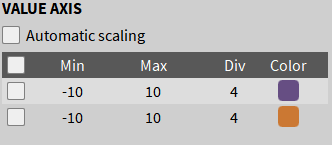
Fig. 1 Y-value axis section for an Oxygen recorder instrument.
:INSTRuments:Y:AUTO? <instrument_identifier>
Syntax |
:INSTRuments:Y:AUTO? <instrument_identifier> |
||||||||
|---|---|---|---|---|---|---|---|---|---|
Description |
Get the instrument’s y-axis autoscaling state. |
||||||||
Parameter |
|
||||||||
Explanation |
Queries the autoscaling state for the instrument’s y-axis (corresponds to the ‘Autoscaling’ checkbox in the Value Axis setup). Note: For instruments without a display axis, an error is queued in the SCPI error queue. |
||||||||
Return Format |
(BOOL, ON | OFF) | NONE |
||||||||
Example |
-> :INSTR:AXI:Y:AUTO? "rec01" <- (BOOL,OFF) ... -> :SCR1:INSTR1:AXI:Y:AUTO? //equivalent query if it is the 1st instrument on screen 1 <- (BOOL,OFF) |
:INSTRuments:Y:AUTO <instrument_identifier>,<literal>,<literal>
Syntax |
:INSTRuments:Y:AUTO <instrument_identifier>,<literal>,<literal> |
||||||||||||||||
|---|---|---|---|---|---|---|---|---|---|---|---|---|---|---|---|---|---|
Description |
Set the instruments y-axis autoscaling status. |
||||||||||||||||
Parameter |
|
||||||||||||||||
Explanation |
Configures the autoscaling state for the instrument’s y-axis (corresponds to the ‘Autoscaling’ checkbox in the Value Axis setup). Note: For instruments without a display axis, an error is queued in the SCPI error queue. |
||||||||||||||||
Example |
-> :INSTR:AXI:Y:AUTO? "rec01" <- (BOOL,OFF) -> :INSTR:AXI:Y:AUTO "rec01",BOOL,ON -> :INSTR:AXI:Y:AUTO? "rec01" <- (BOOL,ON) |
Since an instrument’s y-axis can be associated with multiple channels (see Value axis image above), these attributes are accessed as items via an index number. This :ITEM is the default command for the Y subsystem, so the following expressions are equivalent.
-> :INSTR:AXI:Y:ITEM<y_axis_item_no>:<ommand_or_query>

-> :INSTR:AXI:Y<y_axis_item_no>:command_or_query>   //short form
:INSTRuments:Y:ITEM<y_axis_item_no>:NAME? <instrument_identifier>
Syntax |
:INSTRuments:Y:ITEM<y_axis_item_no>:NAME? <instrument_identifier> |
||||||||
|---|---|---|---|---|---|---|---|---|---|
Description |
Returns the name of the y-axis channel associated with index <y_axis_item_no>. |
||||||||
Parameter |
|
||||||||
Explanation |
This query returns the name of the channel corresponding to the specified y-axis item number (<y_axis_item_no>). Note: For instruments without a display axis, an error is queued in the SCPI error queue. |
||||||||
Return Format |
(STRING, “String”) | NONE |
||||||||
Example |
-> :INSTR:AXI:Y1:NAME? "rec01" //short form <- (STRING,"AI 1/1 Sim") -> :INSTR:AXI:Y:ITEM1:NAME? "rec01" <- (STRING,"AI 1/1 Sim") ... -> :SCr1:INSTR1:AXI:Y1:NAME? //equivalent query if it is the 1st instrument on screen 1 <- (STRING,"AI 1/1 Sim") |
:INSTRuments:Y:ITEM<y_axis_item_no>:MIN? <instrument_identifier>
Syntax |
:INSTRuments:Y:ITEM<y_axis_item_no>:MIN? <instrument_identifier> |
||||||||
|---|---|---|---|---|---|---|---|---|---|
Description |
This query returns the minimum range value for the y-axis associated with index <y_axis_item_no>. |
||||||||
Parameter |
|
||||||||
Explanation |
This query returns the minimum range value for the y-axis associated with index <y_axis_item_no>. Note: For instruments without a display axis, an error is queued in the SCPI error queue. |
||||||||
Return Format |
(FLOAT, <nrf>) | NONE |
||||||||
Example |
-> :INSTR:AXI:Y1:MIN? "rec01" //short form <- (FLOAT,-8.4) -> :INSTR:AXI:Y:ITEM1:MIN? "rec01" <- (FLOAT,-8.4) ... -> :SCR1:INSTR1:AXI:Y:ITEM1:MIN? //equivalent query if it is the 1st instrument on screen 1 <- (FLOAT,-8.4) |
:INSTRuments:Y:ITEM<y_axis_item_no>:MIN <instrument_identifier>,<literal>,<nrf>
Syntax |
:INSTRuments:Y:ITEM<y_axis_item_no>:MIN <instrument_identifier>,<literal>,<nrf> |
||||||||||||||||
|---|---|---|---|---|---|---|---|---|---|---|---|---|---|---|---|---|---|
Description |
Set the instrument’s y-axis minimum range value. |
||||||||||||||||
Parameter |
|
||||||||||||||||
Explanation |
This query configures the minimum range value for the y-axis associated with index <y_axis_item_no>. Note: This setting is ignored if y-axis autoscaling is currently enabled. |
||||||||||||||||
Example |
-> :INSTR:AXI:Y:ITEM1:MIN? "rec01" <- (FLOAT,-8.399998748302385) -> :INSTR:AXI:Y:ITEM1:MIN "rec01",FLOAT,-10.0 -> :INSTR:AXI:Y:ITEM1:MIN? "rec01" <- (FLOAT,-10.0) |
:INSTRuments:Y:ITEM<y_axis_item_no>:MAX? <instrument_identifier>
Syntax |
:INSTRuments:Y:ITEM<y_axis_item_no>:MAX? <instrument_identifier> |
||||||||
|---|---|---|---|---|---|---|---|---|---|
Description |
This query returns the maximum range value for the y-axis associated with index <y_axis_item_no>. |
||||||||
Parameter |
|
||||||||
Explanation |
This query returns the maximum range value for the y-axis associated with index <y_axis_item_no>. Note: For instruments without a display axis, an error is queued in the SCPI error queue. |
||||||||
Return Format |
(FLOAT, <nrf>) | NONE |
||||||||
Example |
-> :INSTR:AXI:Y1:MAX? "rec01" //short form <- (FLOAT,20.0) -> :INSTR:AXI:Y:ITEM1:MAX? "rec01" <- (FLOAT,20.0) ... -> :SCR1:INSTR1:AXI:Y:ITEM1:MAX? //equivalent query if it is the 1st instrument on screen 1 <- (FLOAT,20.0) |
:INSTRuments:Y:ITEM<y_axis_item_no>:MAX <instrument_identifier>,<literal>,<nrf>
Syntax |
:INSTRuments:Y:ITEM<y_axis_item_no>:MAX <instrument_identifier>,<literal>,<nrf> |
||||||||||||||||
|---|---|---|---|---|---|---|---|---|---|---|---|---|---|---|---|---|---|
Description |
Set the instrument’s y-axis maximum range value. |
||||||||||||||||
Parameter |
|
||||||||||||||||
Explanation |
This query configures the maximum range value for the y-axis associated with index <y_axis_item_no>. Note: This setting is ignored if y-axis autoscaling is currently enabled. |
||||||||||||||||
Example |
-> :INSTR:AXI:Y1:MAX? "rec01" //short form <- (FLOAT,20.0) -> :INSTR:AXI:Y:ITEM1:MAX "rec01",FLOAT,-10.0 -> :INSTR:AXI:Y1:MAX? "rec01" <- (FLOAT,10.0) |
:INSTRuments:Y:ITEM<y_axis_item_no>:DIVisions? <instrument_identifier>
Syntax |
:INSTRuments:Y:ITEM<y_axis_item_no>:MAX? <instrument_identifier> |
||||||||
|---|---|---|---|---|---|---|---|---|---|
Description |
This query returns the sub divisions value for the y-axis. |
||||||||
Parameter |
|
||||||||
Explanation |
This query returns the instrument’s y-axis subdivisions associated with index <y_axis_item_no>. Note: For instruments without a display axis, an error is queued in the SCPI error queue. |
||||||||
Return Format |
(INT, <nrf>) | NONE |
||||||||
Example |
-> :INSTR:AXI:Y1:DIV? "rec01" <- (INT,4) -> :INSTR:AXI:Y:ITEM1:DIV? "rec01" <- (INT,4) ... -> :SCR1:INSTR1:AXI:Y1:DIV? //equivalent query if it is the 1st instrument on screen 1 <- (INT,4) |
:INSTRuments:Y:ITEM<y_axis_item_no>:DIVisions <instrument_identifier>,<literal>,<int>
Syntax |
:INSTRuments:Y:ITEM<y_axis_item_no>:DIVisions <instrument_identifier>,<literal>,<int> |
||||||||||||||||
|---|---|---|---|---|---|---|---|---|---|---|---|---|---|---|---|---|---|
Description |
Set the instrument’s y-axis subdivisions for a recorder instrument. |
||||||||||||||||
Parameter |
|
||||||||||||||||
Explanation |
This query configures the subdivisions column value for the y-axis associated with index <y_axis_item_no>. Note: This setting is ignored if y-axis autoscaling is currently enabled. |
||||||||||||||||
Example |
-> :INSTR:AXI:Y1:DIV? "rec01" <- (INT,4) -> :INSTR:AXI:Y1:DIV "rec01",INT,3 -> INSTR:AXI:Y1:DIV? "rec01" <- (INT,3) |
Instrument Cursors Subsystem
Where available, the Instrument Cursors Subsystem is used to manage and query individual cursors, their positions and measurement values. Cursor management is mapped in this subsystem.
This subsystem provides the commands and queries for the following instrument cursors:
A/B Cursor: This cursor pair operates on the instrument’s x-axis. It is the primary cursor pair for the instrument.
A2/B2 Cursor: A secondary cursor pair can be displayed on the instrument’s x-axis.
The commands and queries listed below correspond to the Cursors section of the instrument setup page.
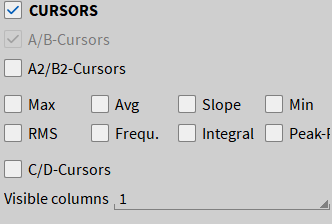
Fig. 2 Cursor configuration for an Oxygen recorder instrument.
:INSTRuments:CURSors:ENABle? <instrument_identifier>
Syntax |
:INSTRuments:CURSors:ENABle? <instrument_identifier> |
||||||||
|---|---|---|---|---|---|---|---|---|---|
Description |
Get the overall state of the instrument’s cursors. |
||||||||
Parameter |
|
||||||||
Explanation |
Queries the overall cursors flag of the instrument. Note: This is the default query for the subsystem (see example below). |
||||||||
Return Format |
(BOOL, ON | OFF) | NONE |
||||||||
Example |
-> :INSTR:CURS? "rec01" //short query <- (BOOL,ON) -> :INSTRuments:CURSors:ENABle? "rec01" <- (BOOL,ON) ... -> :SCR1:INSTR1:CURS? //equivalent query if it is the 1st instrument on screen 1 <- (BOOL,ON) |
:INSTRuments:CURSors:ENABle <instrument_identifier>,<literal>,<literal>
Syntax |
:INSTRuments:CURSors:ENABle <instrument_identifier>,<literal>,<literal> |
||||||||||||||||
|---|---|---|---|---|---|---|---|---|---|---|---|---|---|---|---|---|---|
Description |
Enable or disable the instrument’s cursors. |
||||||||||||||||
Parameter |
|
||||||||||||||||
Explanation |
Show or hide cursors in the referenced instrument. Note: This is the default command for the subsystem (see example below). |
||||||||||||||||
Example |
-> :INSTR:CURS? "rec01" <- (BOOL,ON) -> :INSTR:CURS "rec01",BOOL,OFF -> :INSTR:CURS? "rec01" <- (BOOL,OFF) |
:INSTRuments:CURSors:A? <instrument_identifier>
Syntax |
:INSTRuments:CURSors:A? <instrument_identifier> |
||||||||
|---|---|---|---|---|---|---|---|---|---|
Description |
Get the position of cursor A displayed in the instrument. |
||||||||
Parameter |
|
||||||||
Explanation |
Queries the first position (A) of the A/B cursors displayed on the instrument’s view. |
||||||||
Return Format |
<Literal>,nrf1 | NONE The position is returned in seconds since the measurement start point. |
||||||||
Example |
-> :INSTR:CURS:A? "rec01" <- (FLOAT,6.649999999999636E-1) -> :INSTRuments:CURSors:A? "rec01" <- (FLOAT,-9.728150149950125) ... -> :SCR1:INSTR1:CURS:A? //equivalent query if it is the 1st instrument on screen 1 <- (FLOAT,6.649999999999636E-1) |
:INSTRuments:CURsors:A <instrument_identifier>,<literal>,<seconds>
Syntax |
:INSTRuments:CURsors:A? <instrument_identifier>,<literal>,<seconds> |
||||||||||||||||
|---|---|---|---|---|---|---|---|---|---|---|---|---|---|---|---|---|---|
Description |
Set the first position (A) of the A/B cursors. |
||||||||||||||||
Parameter |
|
||||||||||||||||
Explanation |
Sets the A time position of the A/B cursors in seconds since the measurement start. |
||||||||||||||||
Example |
-> :INSTR:CURS:A? "rec01" <- (FLOAT,5.643599999999651E-1) -> :INSTR:CURS:A "rec01",FLOAT,10.0 -> :INSTR:CURS:A? "rec01" <- (FLOAT,10.0) |
:INSTRuments:CURSors:B? <instrument_identifier>
Syntax |
:INSTRuments:CURSors:B <instrument_identifier> |
||||||||
|---|---|---|---|---|---|---|---|---|---|
Description |
Get the position of cursor B displayed in the instrument. |
||||||||
Parameter |
|
||||||||
Explanation |
Queries the second position (B) of the A/B cursors displayed on the instrument’s view. |
||||||||
Return Format |
<Literal>,nrf1 | NONE The position is returned in seconds since the measurement start point. |
||||||||
Example |
-> :INSTR:CURS:B? "rec01" <- (FLOAT,10.090909090909122) -> :INSTRuments:CURSors:B? "rec01" <- (FLOAT,10.090909090909122) ... -> :SCR1:INSTR1:CURS:B? //equivalent query if it is the 1st instrument on screen 1 <- (FLOAT,10.090909090909122) |
:INSTRuments:CURsors:B <instrument_identifier>,<literal>,<seconds>
Syntax |
:INSTRuments:CURsors:B <instrument_identifier>,<literal>,<seconds> |
||||||||||||||||
|---|---|---|---|---|---|---|---|---|---|---|---|---|---|---|---|---|---|
Description |
Set the second position (B) of the A/B cursors. |
||||||||||||||||
Parameter |
|
||||||||||||||||
Explanation |
Sets the B time position of the A/B cursors in seconds since the measurement start. |
||||||||||||||||
Example |
-> :INSTR:CURS:B? "rec01" <- (FLOAT,10.090909090909122) -> :INSTR:CURS:B "rec01",FLOAT,20.0 -> :INSTR:CURS:B? "rec01" <- (FLOAT,20.0) |
:INSTRuments:CURSors:<statistics>? <instrument_identifier>
Syntax |
:INSTRuments:CURSors:AVG? <instrument_identifier> :INSTRuments:CURSors:FREQuency? <instrument_identifier> :INSTRuments:CURSors:INTEgral? <instrument_identifier> :INSTRuments:CURSors:MAX? <instrument_identifier> :INSTRuments:CURSors:MIN? <instrument_identifier> :INSTRuments:CURSors:PEAK? <instrument_identifier> :INSTRuments:CURSors:RMS? <instrument_identifier> :INSTRuments:CURSors:SLOPE? <instrument_identifier> |
||||||||
|---|---|---|---|---|---|---|---|---|---|
Description |
Get the individual enable flag for displaying statistical values at the instrument cursor position. |
||||||||
Parameter |
|
||||||||
Explanation |
Queries the state of an individual statistical value enable flag. |
||||||||
Return Format |
(BOOL, ON | OFF) | NONE |
||||||||
Example |
-> :INSTR:CURS:MIN? "rec01" //short query <- (BOOL,OFF) -> :INSTRuments:CURSors:MIN? "rec01" <- (BOOL,OFF) ,,, -> :INSTR:CURS:PEAK? "rec01" //short query <- (BOOL,ON) -> :INSTR:CURS:FREQ? "rec01" <- (BOOL,OFF) ... -> :SCR1:INSTR1:CURS:MIN? //equivalent query if it is the 1st instrument on screen 1 <- (BOOL,OFF) |
:INSTRuments:CURSors:[AVG | FREQuency | INTEgral | MAX | MIN | PEAK | RMS | SLOPE] <instrument_identifier>,<literal>,<literal>
Syntax |
:INSTRuments:CURSors:AVG <instrument_identifier>,<literal>,<literal> :INSTRuments:CURSors:FREQuency <instrument_identifier>,<literal>,<literal> :INSTRuments:CURSors:INTEgral <instrument_identifier>,<literal>,<literal> :INSTRuments:CURSors:MAX <instrument_identifier>,<literal>,<literal> :INSTRuments:CURSors:MIN <instrument_identifier>,<literal>,<literal> :INSTRuments:CURSors:PEAK <instrument_identifier>,<literal>,<literal> :INSTRuments:CURSors:RMS <instrument_identifier>,<literal>,<literal> :INSTRuments:CURSors:SLOPE <instrument_identifier>,<literal>,<literal> |
||||||||||||||||
|---|---|---|---|---|---|---|---|---|---|---|---|---|---|---|---|---|---|
Description |
Enable or disable statistical values in the instrument’s cursor value table. |
||||||||||||||||
Parameter |
|
||||||||||||||||
Explanation |
Show or hide individual statistical values in the instrument’s cursors values table (see Cursor configuration image above). |
||||||||||||||||
Example |
-> :INSTR:CURS:MIN? "rec01" <- (BOOL,OFF) -> :INSTR:CURS:MIN "rec01",BOOL,ON -> :INSTR:CURS:MIN? "rec01" <- (BOOL,ON) |
:INSTRuments:CURSors:AABB? <instrument_identifier>
Syntax |
:INSTRuments:CURSors:AABB? <instrument_identifier> |
||||||||
|---|---|---|---|---|---|---|---|---|---|
Description |
Get the state of the instrument’s A2/B2 cursors. |
||||||||
Parameter |
|
||||||||
Explanation |
Queries the state flag of the A2/B2 cursors of the instrument. |
||||||||
Return Format |
(BOOL, ON | OFF) | NONE |
||||||||
Example |
-> :INSTR:CURS:AABB? "rec01" //short query <- (BOOL,OFF) -> :INSTRuments:CURSors:AABB? "rec01" <- (BOOL,OFF) ... -> :SCR1:INSTR1:CURS:AABB? //equivalent query if it is the 1st instrument on screen 1 <- (BOOL,OFF) |
:INSTRuments:CURSors:AABB <instrument_identifier>,<literal>,<literal>
Syntax |
:INSTRuments:CURSors:AABB <instrument_identifier>,<literal>,<literal> |
||||||||||||||||
|---|---|---|---|---|---|---|---|---|---|---|---|---|---|---|---|---|---|
Description |
Enable or disable the instrument’s A2/B2 cursors. |
||||||||||||||||
Parameter |
|
||||||||||||||||
Explanation |
Show or hide A2/B2 cursors in the referenced instrument. |
||||||||||||||||
Example |
-> :INSTR:CURS:AABB? "rec01" <- (BOOL,OFF) -> :INSTR:CURS:AABB "rec01",BOOL,ON -> :INSTR:CURS:AABB? "rec01" <- (BOOL,ON) |
:INSTRuments:CURSors:AA? <instrument_identifier>
Syntax |
:INSTRuments:CURSors:AA? <instrument_identifier> |
||||||||
|---|---|---|---|---|---|---|---|---|---|
Description |
Get the position of cursor A2 displayed in the instrument. |
||||||||
Parameter |
|
||||||||
Explanation |
Queries the first position (A2) of the A2/B2 cursors displayed on the instrument’s view. |
||||||||
Return Format |
<Literal>,nrf1 | NONE The position is returned in seconds since the measurement start point. |
||||||||
Example |
-> :INSTR:CURS:AA? "rec01" <- (FLOAT,7.05449999999928E-1) -> :INSTRuments:CURSors:AA? "rec01" <- (FLOAT,7.05449999999928E-1) ... -> :SCR1:INSTR1:CURS:AA? //equivalent query if it is the 1st instrument on screen 1 <- (FLOAT,7.05449999999928E-1) |
:INSTRuments:CURsors:AA <instrument_identifier>,<literal>,<seconds>
Syntax |
:INSTRuments:CURsors:AA? <instrument_identifier>,<literal>,<seconds> |
||||||||||||||||
|---|---|---|---|---|---|---|---|---|---|---|---|---|---|---|---|---|---|
Description |
Set the first position (A2) of the A2/B2 cursors. |
||||||||||||||||
Parameter |
|
||||||||||||||||
Explanation |
Sets the A2 time position of the A2/B2 cursors in seconds since the measurement start. |
||||||||||||||||
Example |
-> :INSTR:CURS:AA? "rec01" <- (FLOAT,7.05449999999928E-1) -> :INSTR:CURS:AA "rec01",FLOAT,1.0 -> :INSTR:CURS:AA? "rec01" <- (FLOAT,1.0) |
:INSTRuments:CURSors:BB? <instrument_identifier>
Syntax |
:INSTRuments:CURSors:BB <instrument_identifier> |
||||||||
|---|---|---|---|---|---|---|---|---|---|
Description |
Get the position of cursor B2 displayed in the instrument. |
||||||||
Parameter |
|
||||||||
Explanation |
Queries the second position (B2) of the A2/B2 cursors displayed on the instrument’s view. |
||||||||
Return Format |
<Literal>,nrf1 | NONE The position is returned in seconds since the measurement start point. |
||||||||
Example |
-> :INSTR:CURS:BB? "rec01" <- (FLOAT,2.398529999999937) -> :INSTRuments:CURSors:BB? "rec01" <- (FLOAT,2.398529999999937) ... -> :SCR1:INSTR1:CURS:BB? //equivalent query if it is the 1st instrument on screen 1 <- (FLOAT,2.398529999999937) |
:INSTRuments:CURsors:BB <instrument_identifier>,<literal>,<seconds>
Syntax |
:INSTRuments:CURsors:BB <instrument_identifier>,<literal>,<seconds> |
||||||||||||||||
|---|---|---|---|---|---|---|---|---|---|---|---|---|---|---|---|---|---|
Description |
Set the second position (B2) of the A2/B2 cursors. |
||||||||||||||||
Parameter |
|
||||||||||||||||
Explanation |
Sets the B2 time position of the A2/B2 cursors in seconds since the measurement start. |
||||||||||||||||
Example |
-> :INSTR:CURS:BB? "rec01" <- (FLOAT,2.398529999999937) -> :INSTR:CURS:BB "rec01",FLOAT,2.5 -> :INSTR:CURS:BB? "rec01" <- (FLOAT,2.5) |
:INSTRuments:CURSors:COLumns? <instrument_identifier>
Syntax |
:INSTRuments:CURSors:COLumns? <instrument_identifier> |
||||||||
|---|---|---|---|---|---|---|---|---|---|
Description |
This query returns the number of columns displayed in the cursors values table. |
||||||||
Parameter |
|
||||||||
Explanation |
Queries the number of visible columns displayed in the cursors values table. |
||||||||
Return Format |
(INT, <nrf>) | NONE |
||||||||
Example |
-> :INSTR:CURS:COL? "rec01" <- (INT,1) -> :INSTRuments:CURSors:COLumns? "rec01" <- (INT,1) ... -> :SCR1:INSTR1:CURS:COL? //equivalent query if it is the 1st instrument on screen 1 <- (INT,1) |
:INSTRuments:CURSors:COLumns <instrument_identifier>,<literal>,<int>
Syntax |
:INSTRuments:CURSors:COLumns <instrument_identifier>,<literal>,<int> |
||||||||||||||||
|---|---|---|---|---|---|---|---|---|---|---|---|---|---|---|---|---|---|
Description |
Set the number of columns in the instrument’s cursors values table. |
||||||||||||||||
Parameter |
|
||||||||||||||||
Explanation |
This command configures the number of visible columns the instrument’s cursors values table. |
||||||||||||||||
Example |
-> :SCR1:INSTR1:CURS:COL? <- (INT,1) -> :INSTR:CURS:COL "rec01",INT,2 -> :SCR1:INSTR1:CURS:COL? <- (INT,2) |
:INSTRuments:CURSors:VALues<line_number>? <instrument_identifier>

Fig. 3 Cursors values table shown in an Oxygen recorder instrument.
Syntax |
:INSTRuments:CURSors:VALues<line_number>? <instrument_identifier> |
||||||||
|---|---|---|---|---|---|---|---|---|---|
Description |
Reading the data values of the cursors values table. |
||||||||
Parameter |
|
||||||||
Explanation |
This query retrieves a specific row, identified by <line_number>, from the cursors values table above. |
||||||||
Return Format |
(<column_name>, <String>),[(<column_name>,<nrf>)[,(<column_name>,<nrf>)[,…]]] | NONE |
||||||||
Example |
-> :INSTR:CURS:VAL1? "rec01"
<- ("Channel","AI 1/1 Sim"),("A",2.472134975918232),("B",-7.984213112843818),("Delta",-10.45634808876205),("Min",-7.999998807907034)
-> :INSTR:CURS:VAL2? "rec01"
<- ("Channel","AI 1/1 Sim"),("A",2.472134975918232),("B",-7.984213112843818),("Delta",-10.45634808876205),("Min",-7.999998807907034)
-> :INSTR:CURS:VAL3? "rec01"
<- ("Channel","AI 1/3 Sim"),("A",-3.911999697208386),("B",9.984005092621153E-1),("Delta",4.910400206470502),("Min",-8.0)
...
-> :SCR1:INSTR1:CURS:VAL? //equivalent query if it is the 1st instrument on screen 1
<- ("Channel","AI 1/1 Sim"),("A",2.472134975918232),("B",-7.984213112843818),("Delta",-10.45634808876205),("Min",-7.999998807907034)
|
Output Instrument Subsystem
:INSTRuments:OUTputchannel:STATe? <instrument_identifier>
Syntax |
:INSTRuments:OUTputchannel:STATe? <instrument_identifier> |
||||||||
|---|---|---|---|---|---|---|---|---|---|
Description |
Query the current state of an output channel instrument. |
||||||||
Parameter |
|
||||||||
Explanation |
|
||||||||
Return format |
<String> |
||||||||
Example |
-> :INSTR:OUT:STAT? "out01" <- Stopped ... -> :SCR1:INSTR1:OUT:STAT? //equivalent if out01 is instrument 1 on screen 1 <- Stopped |
:INSTRuments:OUTputchannel:STARt <instrument_identifier>
Syntax |
:INSTRuments:OUTputchannel:STARt <instrument_identifier> |
||||||||
|---|---|---|---|---|---|---|---|---|---|
Description |
Start streaming on an analog output instrument. |
||||||||
Parameter |
|
||||||||
Explanation |
Starts streaming to assigned analog output channels of the instrument, if it is in the Paused or Stopped state. |
||||||||
Example |
-> :INSTR:OUT:STATE? "out01" <- Stopped -> :INSTR:OUT:STAR "out01" -> :INSTR:OUT:STATE? "out01" <- Started ... -> :SCR1:INSTR1:OUT:STARt //equivalent if out01 is instrument 1 on screen 1 |
:INSTRuments:OUTputchannel:PAUSE <instrument_identifier>
Syntax |
:INSTRuments:OUTputchannel:PAUSE <instrument_identifier> |
||||||||
|---|---|---|---|---|---|---|---|---|---|
Description |
Pause streaming on an analog output instrument. |
||||||||
Parameter |
|
||||||||
Explanation |
Pause streaming to assigned analog output channels of the instrument, if it is in the Started state. |
||||||||
Example |
-> :INSTR:OUT:PAUSE "out01" ... -> :SCR1:INSTR1:OUT:PAUSE //equivalent if out01 is instrument 1 on screen 1 |
:INSTRuments:OUTputchannel:STOP <instrument_identifier>
Syntax |
:INSTRuments:OUTputchannel:STOP <instrument_identifier> |
||||||||
|---|---|---|---|---|---|---|---|---|---|
Description |
Stop streaming on an analog output instrument. |
||||||||
Parameter |
|
||||||||
Explanation |
Stop streaming to assigned analog output channels of the instrument, if it is in the Started state and reset the playback cursor to the start position. |
||||||||
Example |
-> :INSTR:OUT:STOP "out01" ... -> :SCR1:INSTR1:OUT:STOP //equivalent if out01 is instrument 1 on screen 1 |