Setting up Ubuntu 24.04
Operating system & Ubuntu kernel version
Power Group Realtime calculations require an Ubuntu 24.04 Linux operating system. To provide realtime calculation with low latency, a Linux kernel version >= 6.12 or RT-kernel must be used. In addition, the scheduler needs to be configured to be fully preemptive.
Hint
The software must be installed on a native Linux operating system running directly on the hardware. It will not provide realtime latency inside a virtual machine (e.g., VirtualBox, VMware) or a compatibility layer/containerized environment (e.g., WSL, Docker).
1. Check Linux kernel version
Enter uname -a into a terminal to query the kernel version.
dewetron@DEWE3-RM16-0:~$ uname -a
Linux DEWE3-RM16-0 6.17.0-29-generic #29~24.04.1-Ubuntu SMP PREEMPT_DYNAMIC Mon May 11 10:30:58 UTC 2 x86_64 x86_64 x86_64 GNU/Linux
2. Check preemptive scheduler
Enter sudo cat /sys/kernel/debug/sched/preempt to read the current scheduler setting.
It needs to be set to (full).
This setting is important to let the CPU quickly switch to the highest priority task even before a lower priority task is completed.
The result is a low latency of real-time computations and outputs, while the general system stays unaffected (except for a reduced system throughput).
dewetron@DEWE3-RM16-0:~$ sudo cat /sys/kernel/debug/sched/preempt
none voluntary (full) lazy
If the preempt is set to any other than (full), the low latency cannot be guaranteed, even if the kernel is >= 6.12
3. Automatically configure scheduler at startup
After installing OXYGEN, the use should modify the boot configuration with the optimized scheduler settings. Enter following commands and reboot the system.
cd /etc/default/grub.d/sudo ln -s /usr/share/Oxygen/grub/99-oxygen-preempt.cfgsudo update-grub
dewetron@DEWE3-RM16-0:~$ cd /etc/default/grub.d/
dewetron@DEWE3-RM16-0:/etc/default/grub.d$ sudo ln -s /usr/share/Oxygen/grub/99-oxygen-preempt.cfg
dewetron@DEWE3-RM16-0:/etc/default/grub.d$ sudo update-grub
Sourcing file `/etc/default/grub'
Sourcing file `/etc/default/grub.d/99-oxygen-preempt.cfg'
...
done
After a reboot of the system, the preempt setting should be (full).
Note that for OXYGEN 8.1, the cfg file is located at /usr/Oxygen/grub/99-oxygen-preempt.cfg.
Check with command in 2. Check preemptive scheduler.
4. Setting Power Mode to Performance
It is also recommended to set the Ubuntu Power Mode to Performance to benefit from maximum CPU capability. To set the Power Mode to Performance following steps are necessary:
Open Settings.
Select System → Power.
Find Power Mode.
Choose Performance.
Close Settings.
Power Mode Settings:
Settings
└── System
    └── Power
        └── Power Mode
            ├── Performance  ← Select this
            ├── Balanced
            └── Power Saver
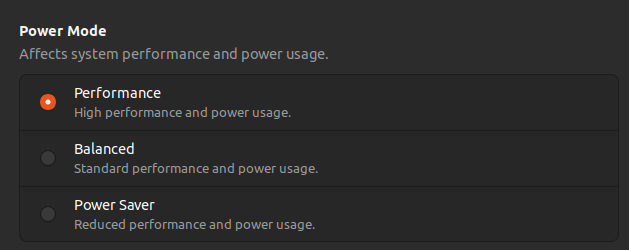
Fig. 4 Ubuntu Power Modes.
This Power Mode setting will also be saved for next startup.