OPC UA Client
OPC UA Client Overview
The OXYGEN OPC UA Client enables data acquisition and monitoring by connecting to external OPC UA servers. It ensures reliable, industry-standard communication and supports a wide range of applications, from basic connectivity to high-speed data updates.
Setting up an OPC UA Client
To use the OPC UA Client in OXYGEN (v8.1 and higher), follow these steps:
Add Plugin: Open the OXYGEN channel list, click the + button (See ① in Fig. 3), and select OPC UA Client from the Data Input section.
Select or Add Endpoint: Choose an existing server from Configured Endpoints or create a new one in the Add Endpoint section (See ④ in Fig. 3).
Configure Parameters:
Name: Enter a unique identifier for the OPC UA Server.
URL: Enter the OPC UA Server address (e.g., opc.tcp://127.0.0.1:4840).
Time Source: Define how data is timestamped:
Internal Time: Uses the local OXYGEN time upon data reception.
Reported Time: Uses the OPC UA Server’s timestamp. Ensure the OPC UA Server is synchronized and provides timestamps in UTC to avoid data inconsistency.
Publishing Interval: Set the cycle rate in [ms] for data subscriptions. The minimum/maximum limits are defined by the connected OPC UA Server.
Verify Connection: Click Check Status (See ③ in Fig. 3). The system will display “Server reachable” (green) or “Server not reachable” (red).
Save & Add: Click the Store Config button (see ② in Fig. 3) to store the configuration in the Configured Endpoints list. Click Add (See ⑤ in Fig. 3) to finalize.
Hint
You can export the Configured Endpoints as a .csv file to replicate settings across different projects or systems.
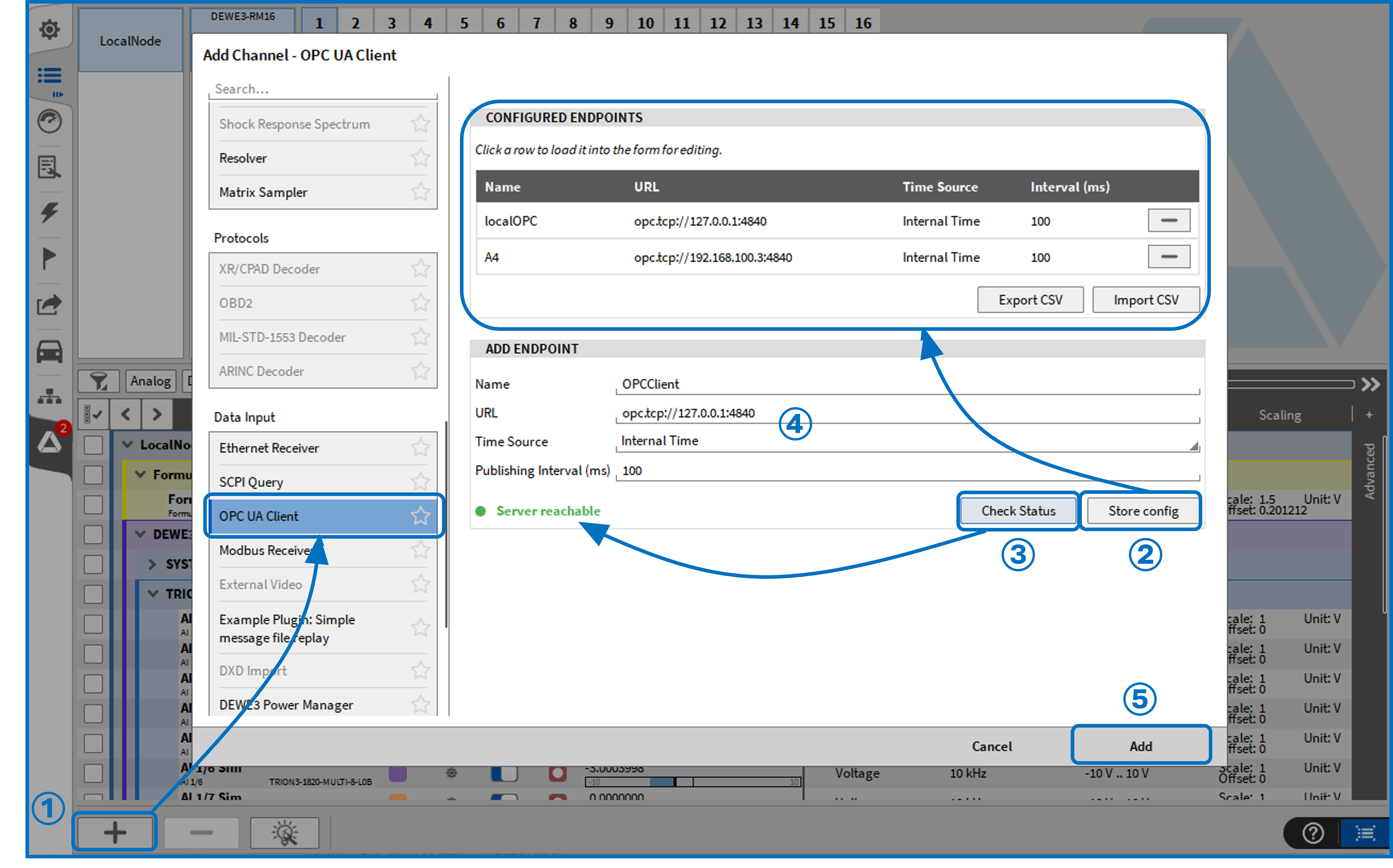
Fig. 3 Activate an OPC UA Client
Once added, the OPC UA Client will appear as a new section in the OXYGEN channel list (See Fig. 4).
Connection handling
To modify an existing OPC UA Client, click the gear icon (See ① in Fig. 4) in the OXYGEN channel list. You can update the Name, URL, Time Source, and Publishing Interval at any time.
Connection States:
The client provides real-time status feedback for troubleshooting:
Server not reachable: Indicates a network-level issue (e.g., wrong IP or firewall).
Not connected: The OPC UA Server is physically reachable, but the session could not be established.
Connected: A session is fully established and active.
Automatic Reconnection:
Configuration Changes: Modifying critical parameters (e.g., URL or security settings) automatically triggers a reconnection.
Connection Loss: If the connection is interrupted, the client attempts to reconnect automatically.
Restoration: Once reconnected, all subscriptions and monitored items are restored automatically.
Attention
For reliable restoration, the server should maintain stable namespace indices and node identifiers.
Security, Certificates and authentication
Security settings (See ③ in Fig. 4) follow the standard OPC UA protocol. The client automatically queries the server for available endpoints and security policies. If a previously selected policy is no longer supported by the server, it will be flagged in the interface.
Certificate Handling:
Automatic Generation: Simplifies setup; recommended for most scenarios.
Manual Provisioning: Used for environments with strict security or PKI requirements. Manual certificates must be explicitly enabled.
Authentication:
Two authentication modes are available (See ④ in Fig. 4):
Anonymous: No credentials required.
Username/Password: Required if the server restricts access.
Attention
For security reasons, passwords are not stored. They must be re-entered after restarting the application.
Data Acquisition:
If the server requires authentication, a successful login is mandatory before data acquisition can begin.
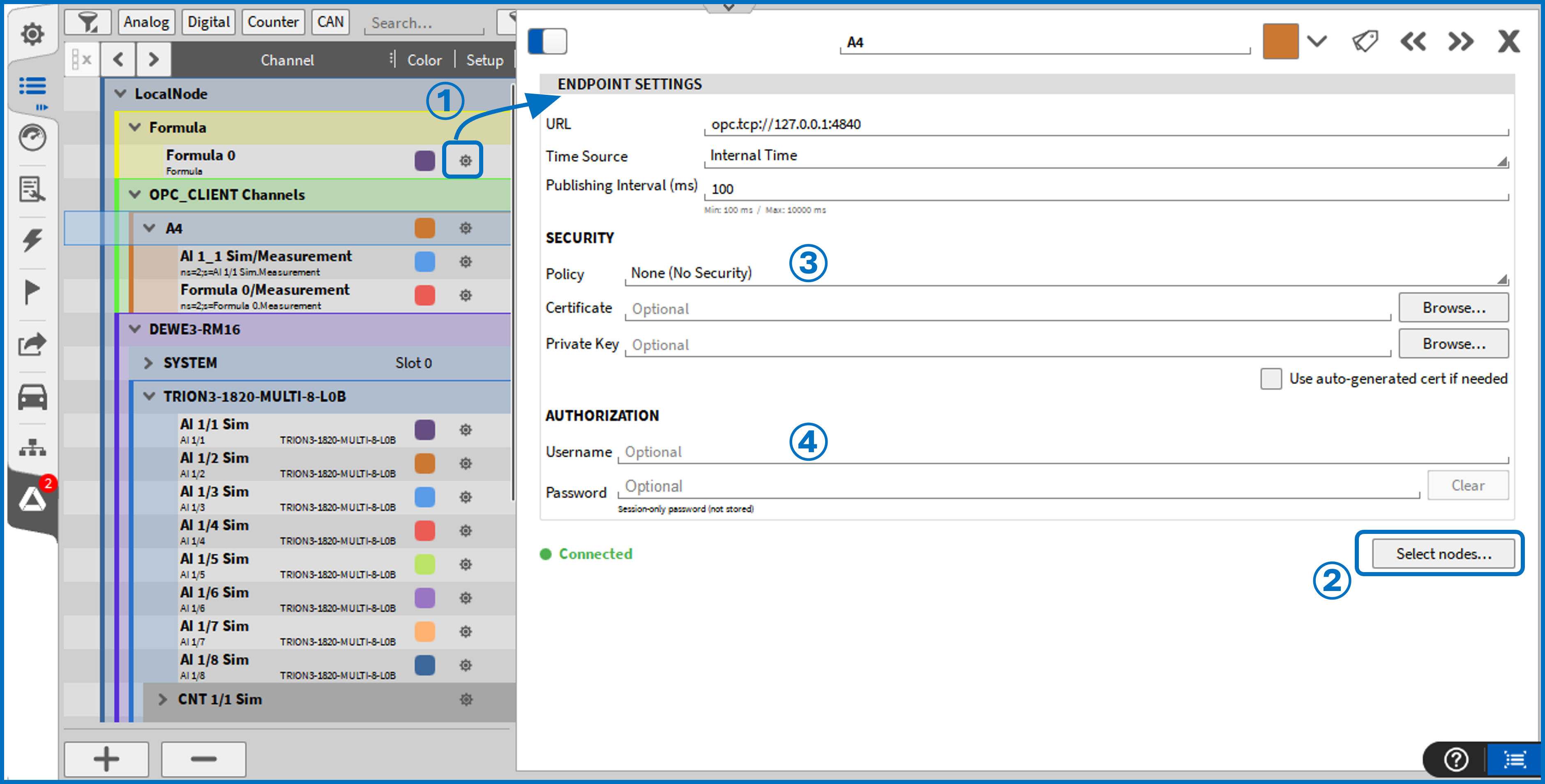
Fig. 4 OPC UA Client settings
Channel Setup
After configuring the server, click Select Nodes (See ② in Fig. 4) to choose the channels for subscription. Data acquisition is managed via the standard OPC UA subscription mechanism.
Node Selection: All available nodes are displayed in a tree view (See Fig. 5). The structure and available objects depend on the specific OPC UA Server implementation. For details on parameters provided by an OXYGEN OPC UA Server, refer to the Channel Parameters section in the Server chapter.
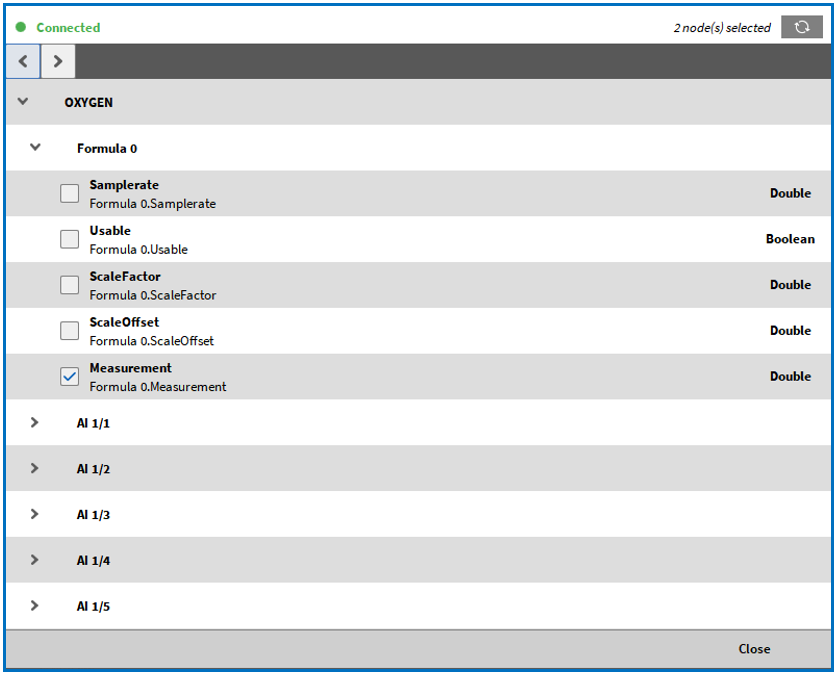
Fig. 5 Node selection for OPC UA Client
Channel Configuration:
Once selected, channels appear in the OXYGEN channel list under the respective OPC UA Client section. Click the gear icon (See ① in Fig. 6) of a channel to edit its properties:
Sampling Interval [ms]: Defines how often the server samples the data (See ② in Fig. 6).
Example: A Sampling Interval of 20 ms combined with a Publishing Interval of 100 ms means the server sends a packet every 100 ms containing 5 sampled values for that channel.
Scaling: Individual scaling can be applied to each channel in the scaling section (See ③ in Fig. 6).
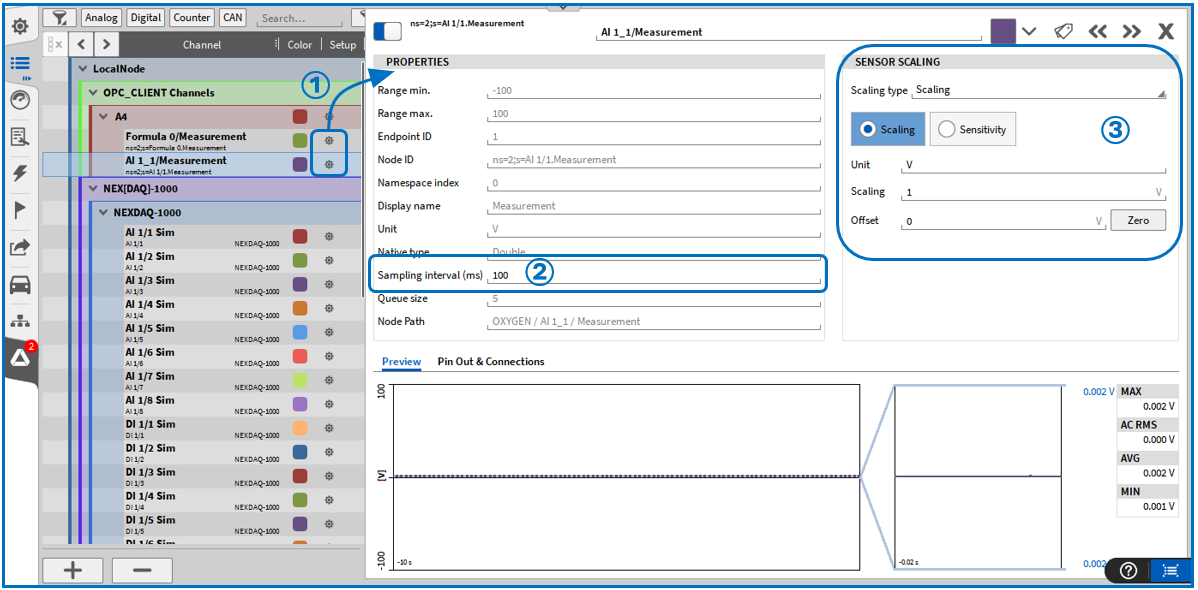
Fig. 6 OPC UA Client channel settings
Buffering and Update Behavior
The client utilizes buffering (queueing) for monitored items to prevent data loss during temporary communication delays or high-speed updates. Data is recorded whenever a value or its timestamp changes. This ensures consistent time-series recording even if the measurement value remains constant.
General Usage Notes
To ensure reliable operation, consider the following:
Server Implementation: The client requires a standard-compliant OPC UA service implementation on the server side.
Stable Identifiers: Use stable node identifiers to ensure consistent automatic reconnection.
Security: Align security policies with your specific network deployment requirements.
Time Sync: Verify OPC UA Server time synchronization when using “Reported Time” (OPC UA Server timestamps). When using OPC UA Client-side (“Internal Time”) timestamps, note that data may be delivered in batches (depending on OPC UA queue size and publishing interval). As a result, multiple values may share very similar or identical client timestamps, even if they were sampled at different times on the server. Ensure both server and client system clocks are correctly synchronized. It is recommended not to use manually adjusted or unsynchronized system time, as this may result in incorrect or misleading timestamps, especially when working with the reported time of the OPC UA Server.
Performance Considerations
The OXYGEN OPC UA Client is verified for high-performance scenarios, including millisecond-level sampling. However, actual performance is influenced by:
Server processing capabilities and system load.
Network bandwidth and latency.
The ratio between sampling and publishing intervals.
Recommendation: Always balance sampling and publishing intervals to match your hardware and network infrastructure.