OPC UA Server
Configuring the OPC UA Server in OXYGEN
OXYGEN (v8.1 and higher) includes an integrated OPC UA server for standardized data exchange with external OPC UA Clients.
Setup steps: (See Fig. 2)
Navigate to Measurement Settings > Servers
Click + to create a new OPC UA Server instance.
Configure the OPC UA Server parameters (see below)
Select the channels to be exposed to the OPC UA Clients.
Click the Play button to start the server
Configuration Parameters:
Port: Set the communication port (default: 4840). Adjust this to meet your IT or firewall requirements.
Update Rate (Global Limit): Defines the maximum frequency for data processing to manage system load and bandwidth.
Sampling Interval: Frequency at which the server polls internal data.
Publishing Interval: Frequency at which the server sends data packets to the client.
Attention
Shorter intervals enable faster monitoring, while longer intervals minimize the measurement device’s CPU load.
Statistic Mode:
Determines how data is processed for high-frequency channels within the publishing interval:
Last Value: Returns the most recent value (default).
Minimum / Maximum: Returns the lowest or highest value.
Average: Returns the arithmetic mean.
RMS: Returns the Root Mean Square value.
Channel Selection: Enable or disable specific measurement channels. Only selected channels are visible in the OPC UA server’s address space.
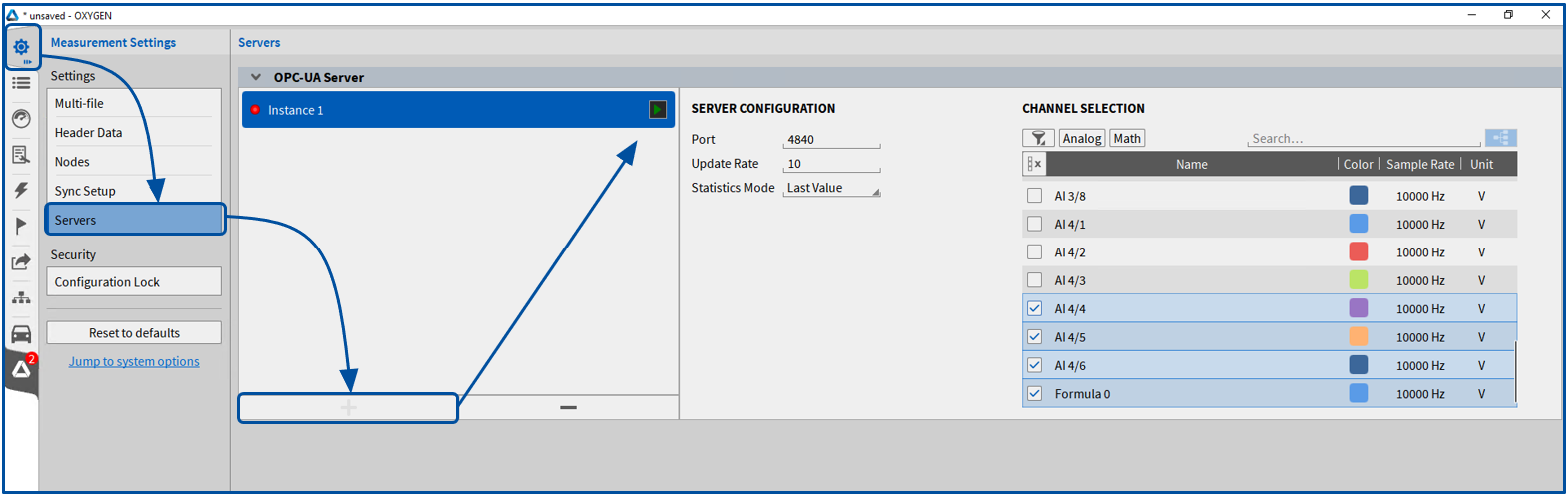
Fig. 2 Activate and set OPC UA Server in OXYGEN.
Channel Parameters
For every channel activated on the OXYGEN OPC UA Server, the following parameters are available to the OPC UA Client:
Samplerate: The actual acquisition rate of the channel within OXYGEN (independent of the OPC UA publishing or sampling intervals).
Usable: the channel status in OXYGEN: 1 (Active) or 0 (Inactive/Deactivated).
ScaleFactor: The scaling factor applied to the channel in OXYGEN.
ScaleOffset: The scaling offset applied to the channel in OXYGEN.
Measurement: The actual measurement value of the channel.