MODBUS Server
Configuring a MODBUS Server in OXYGEN
OXYGEN (v8.1 and higher) includes an integrated MODBUS Server for standardized data exchange with external MODBUS Clients.
Setup steps
Navigate to Measurement Settings > Servers (See ① in Fig. 3)
Click + to create a new MODBUS Server instance.
Configure the MODBUS Server parameters (See ② in Fig. 3)
Select the channels to be published for MODBUS Clients (See ③ in Fig. 3).
Store the set configuration as .xml for MODBUS Clients (See ④ in Fig. 3).
Click the Play button to start the server (See ⑤ in Fig. 3).
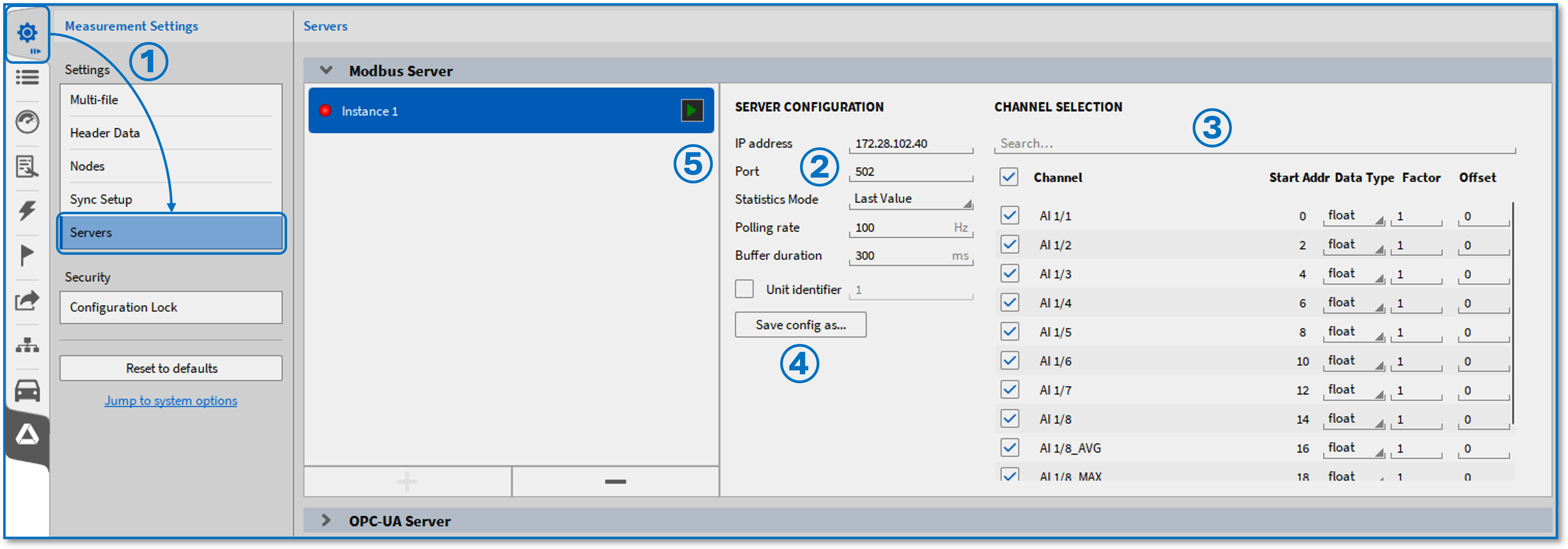
Fig. 3 Activate a MODBUS Server in OXYGEN
Configuration Parameters
(See ② in Fig. 3)
IP address: Set the communication IP address. Adjust this to meet your IT or firewall requirements.
Port: Set the communication port (default: 502). Adjust this to meet your IT or firewall requirements.
Statistic Mode: Select between Last Value (default) or Average based on polling rate.
Polling Rate: Define update rate of the MODBUS Server from 1 to 100 Hz (default: 100 Hz).
Buffer duration: Define the duration data is kept before discarding, from 0 to 1000 ms before publishing the data (default: 300 ms).
Unit identifier: Activate/Deactivate a Unit identifier. If activated, set a value between 0 - 255. Only request from MODBUS Clients including the selected Unit identifier will be accepted by the server.
Channel Selection
(See ③ in Fig. 3)
Enable or disable specific measurement channels. Only selected channels are accessible in the MODBUS server’s address space. Valid channels include synchronous and asynchronous scalar channels.
Channel: Valid channels from the OXYGEN channel list. These are enabled by checking the corresponding checkbox.
Start Addr: Will be automatically set according to the selected Data Type (see below).
Data Type: Select the data type of the respective channel. Following data types are available:
float: Address space of 2 will be used
double: Address space of 4 will be used
int16: Address space of 1 will be used
uint16: Address space of 1 will be used
int32: Address space of 2 will be used
uint32: Address space of 2 will be used
Factor: Select a scaling factor for the respective channel
Offset: Select a scaling offset for the respective channel